
Imagine this: one day, a WordPress site you built months ago simply greets you with the message:
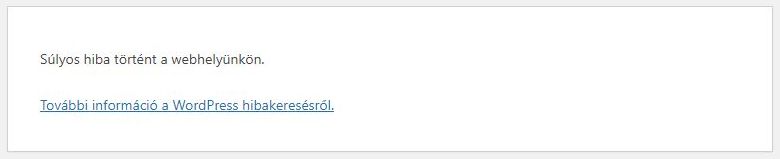
There has been a critical error on this website!
No WordPress admin.
No cPanel access.
No FTP connection.
A great starting point, right? Because when everything collapses, that’s when real debugging begins.
Step 0: Contact the hosting provider
The website owner contacted the service provider first. He received this response:
You informed us that your website is unavailable, a security update has been made on our web server, unfortunately very old websites may no longer appear this way! Please contact the website developer to update your site! These old PHP-based sites already posed a very high security risk.
I joined the conversation here:
I am the web developer. It seems that you did not look at the owner’s website, you just wrote the answer above. Please forgive me if I am wrong! I simply do not understand what you mean when you write in your service provider’s response that “these old PHP-based sites…” The website – like your website! – is a WordPress-based site. It is not an old site at all, although you are right that it is PHP-based, like all WP sites. I assume that you did not mean “high security risk” for this type of site either! In my experience, the server’s security update rarely affects the display of a WordPress site, so your answer is not a reassuring, acceptable answer, but rather raises further questions. If the security update is the cause of the error, I think we have exhausted the concept of service provider risk bearing! Please, inform me exactly what security update was made? Maybe we can start from this.
I tried not to be offensive, but I was still a little surprised by the answer:
I apologize, I really didn’t check the website more thoroughly. We switched from CentOs to Alma Linux and only PHP 8.0 or higher versions are available here, this caused problems for several websites, so I wrote such a template answer. I changed the access password of the site and checked it, I was able to log in to cPanel and access the hosting with FTP.
I thanked for the answer and I was able to start working.
Step 1: Regain Access to the Server
Since the cPanel and FTP were initially unreachable, I contacted the hosting provider and asked for temporary SSH access. Once in, I navigated to the WordPress directory:
cd /storage/something/public_html
To get the site back online, I needed to disable all plugins manually. The simplest trick:
mv wp-content/plugins wp-content/plugins_disabled
Reload the website – and boom, the WordPress core loads again (though without plugins).
Step 2: The First Fatal Error
Once I could see the original error, it was a PHP fatal error caused by a plugin named tabs-shortcode:
Fatal error: Uncaught Error: Non-static method OLT_Tab_Shortcode::add_shortcode() cannot be called statically in tabs-shortcode.php on line 79
That means the plugin was trying to call a non-static function statically – something like this:
OLT_Tab_Shortcode::add_shortcode();
But it should’ve been called via an instance:
$olt = new OLT_Tab_Shortcode();
$olt->add_shortcode();
Fixing this (or just removing the plugin) solved the first fatal crash.
Step 3: The Second Plugin Trap
After disabling that one, another plugin immediately failed. Same strategy: rename its folder, refresh, and move on.
When dealing with legacy WordPress installs, this “rinse and repeat” cycle is common – outdated plugins often aren’t compatible with modern PHP 8+.
In this specific case, the provider also improperly prepared one of the 8+ PHP versions, and if this is chosen, the developer may face even more serious errors. I reported this to the provider, but I did not receive a response to this report.
Step 4: The Theme Takes Over (Meris Widget Error)
Next, the error shifted to the theme itself:
Fatal error: Too few arguments to function WP_Widget::__construct(), 0 passed and at least 2 expected
This pointed to the Meris theme’s theme-widget.php.
In that file, each widget class looked like this:
class meris_home_service_widget extends WP_Widget {
    function meris_home_service_widget() {
        parent::WP_Widget(false, $name = __('Meris: Service', 'meris'));
    }
}
This is outdated PHP 5 code.
Here’s the modernized PHP 8 version:
class meris_home_service_widget extends WP_Widget {
    function __construct() {
        parent::__construct(
            'meris_home_service_widget',
            __('Meris: Service', 'meris'),
            array('description' => __('Displays home service items', 'meris'))
        );
    }
}
Once all widget constructors were rewritten, the theme finally loaded… almost.
Step 5: The Final Boss – count() TypeError
Then came this beauty:
Fatal error: Uncaught TypeError: count(): Argument #1 ($value) must be of type
Countable|array, string given in index.php on line 76
The problem was this snippet:
$columns = isset($home_sections_array['widget-area-column-item'][$sanitize_areaname])
    ? $home_sections_array['widget-area-column-item'][$sanitize_areaname]
    : "";
$column_num = count($columns);
If $columns wasn’t an array, count() failed.
Here’s the fixed version:
$columns = isset($home_sections_array['widget-area-column-item'][$sanitize_areaname])
    ? $home_sections_array['widget-area-column-item'][$sanitize_areaname]
    : array();

if (!is_array($columns)) {
    $columns = array($columns);
}

$column_num = count($columns);
That simple is_array() guard finally stabilized the site.
Step 6: Clean Up and Prevent Future Chaos
Once everything worked again:
- I deleted the broken plugins permanently.
- Updated PHP to the latest stable version.
- Switched error logging on for future issues:
define('WP_DEBUG', true);
define('WP_DEBUG_LOG', true);
define('WP_DEBUG_DISPLAY', false);
And finally, I set up automatic offsite backups using a remote cron job – because no one wants to go through this twice.
What I Learned
- Old WordPress themes often contain ancient PHP 5 code that breaks under PHP 8+.
- Static vs. non-static method calls are one of the most common causes of fatal errors in legacy plugins.
- Always wrap count() in is_array() when you can’t guarantee the variable type.
- Having SSH access is worth gold when FTP and cPanel fail.
- The real debugging starts only after you’ve seen five different errors in a row.
Final Thoughts
Recovering a WordPress site from complete blackout teaches you patience, precision, and humility.
Sometimes, it’s not about rewriting code – it’s about understanding the story each error tells you.
When your site just says “There has been a critical error on this website!,” take it as an invitation.
The deeper you dig, the more you learn about the invisible architecture holding everything together.
Because as I like to remind myself on How I Built IT:
Every bug is a lesson disguised as frustration.Buy me a coffee?

If you enjoyed this story, you can buy me a coffee. You don’t have to – but it means a lot and I always turn it into a new adventure.
Buy a coffee for Steve
 Linktree
 Short introduction