

How I Diagnosed and Fixed a Complex Caching Conflict on a WordPress Website
When you build websites for a living, you eventually face the same paradox I did: Your optimization plugin becomes the bottleneck.
That’s exactly what happened to me while optimizing my WordPress site – online-dentist.hu. This post is a deep-dive case study of how I went from “cache doesn’t work at all” to a fast, stable, and fully automated setup, combining the best of modern WordPress performance practices.
The Background
My site was running WP Rocket, one of the most popular speed optimization plugins.
However, despite correct configuration and a valid license, the cache never activated.
The response headers always returned:
# yaml

cache-control: no-cache, no-store, must-revalidate
x-powered-by: PHP/8.4.12
The WP Rocket “Cache” tab was missing, and even though the plugin created cache files under
/wp-content/cache/wp-rocket/, the server never served them.
So began a deep technical journey into headers, .htaccess rules, and server-level cache control.
Step 1: Debugging WP Rocket
Over several rounds of testing, I:
- verified headers through DevTools and WebPageTest,
- inspected .htaccess, advanced-cache.php, and wp-config.php,
- reinstalled WP Rocket cleanly,
- and even wrote a custom PHP header plugin to override Cache-Control.
Despite all this, the cache remained inactive – no x-rocket-cache: hit, no static file delivery.
The final clue came from my hosting provider’s support team:
“Your server uses Apache. LiteSpeed (Accelerate WP) is available, but the Rocket rewrite rules won’t apply here.”
In other words, WP Rocket was operating in PHP-only mode – optimizing assets, but not caching statically.
Step 2: Switching to LiteSpeed Cache
Following the provider’s advice, I activated Accelerate WP, which is essentially LiteSpeed Cache. Initially, I was optimistic – the plugin integrated well, and PageSpeed scores jumped slightly.
However, when inspecting response headers, I saw:
# yaml

x-litespeed-cache-control: no-cache
x-litespeed-server-type: NONE
That second line said it all:
The site wasn’t running on a real LiteSpeed server – it was still Apache behind the scenes. The plugin worked only as a frontend optimizer, not as a true server-level cache.
Step 3: The Aha Moment: W3 Total Cache
So I made a final switch to W3 Total Cache, a plugin I had used many years ago –
and it instantly clicked (literally).
The response headers finally looked like this:
# yaml

cache-control: max-age=3600, public
etag: "44af3fc372e6e07881169370dc86fed2"
last-modified: Wed, 15 Oct 2025 10:50:41 GMT
x-powered-by: W3 Total Cache/2.8.1
At last – proper caching, full gzip compression, and predictable static file handling.
WebPageTest confirmed it:
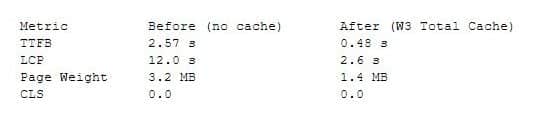
It wasn’t just faster – it was consistent.
Step 4: Fixing Mobile and Post Pages
After celebrating, I noticed a new issue: Blog post pages sometimes failed to load on mobile devices.
The reason?
By default, W3 Total Cache serves a single static HTML version for all devices – unless you manually enable Mobile User Agent Groups.
Solution:
- Navigate to Performance → User Agent Groups.
- Enable “Mobile” and “Create a separate cache group.”
- Purge all caches.
That fixed it instantly – mobile visitors now get their own cached version, and posts render perfectly.
Step 5: Preloading the Cache
By default, W3 builds cache files on first visit, which means the first user after a purge always triggers a slow load.
To automate this, I enabled:
- Automatic page cache priming (sitemap preload) under Performance → Page Cache
- Sitemap: https://online-dentist.hu/sitemap.xml
- Interval: every 15 minutes, 20 pages per batch
Additionally, I tested WP Warm Cache, a simple but powerful plugin that preloads all URLs in the background.
Now, the cache stays warm 24/7 – even when no one visits.
Results & Key Takeaways
After the final setup:
- TTFB: 0.4–0.6 s
- LCP: < 2.5 s
- Speed Index: ~4 s
- Mobile PageSpeed: 90+ consistently
- Server load: Stable, low CPU usage
What I Learned
- Not all cache plugins can work on every server.
- WP Rocket expects write access and proper .htaccess rewriting – not always possible on shared Apache hosting.
- LiteSpeed Cache ≠ LiteSpeed Server.
- Unless your host runs LSWS or OLS, the plugin can’t deliver cached HTML.
- W3 Total Cache remains a powerhouse
- especially for Apache-based WordPress sites that need predictable caching and full control.
- Always verify with response headers, not assumptions.
- The truth is in cache-control and x-powered-by.
- Preload is everything.
- A cache is only useful if it’s ready before your visitors arrive.
Final Thought
It took patience, dozens of tests, and some friendly frustration, but I finally turned a stubborn WordPress install into a finely tuned, high-performing system.
The takeaway?
Speed doesn’t come from a single plugin – it comes from understanding how they interact with your server.
Buy me a coffee?

If you enjoyed this story, you can buy me a coffee. You don’t have to – but it means a lot and I always turn it into a new adventure.
Buy a coffee for Steve
 Linktree
 Short introduction